


Dash Cam Wiring for Mercedes-Benz Vehicles
Plan power, parking recording and rear-camera routing for your exact Mercedes
Choose the installation around the job you need it to do
A camera that records only while driving needs a different power plan from one that watches the car while parked. Decide how much parking coverage you want, where the recorder or battery will sit and whether a rear camera must cross a moving door.
Our recommendation is to agree on the power source and cable route before buying extensions. Bring the installer your Mercedes model, model year, body style, dash cam model and any battery-pack details. The same badge can cover different electrical systems and trim layouts.
| Question | What the answer changes |
|---|---|
| Driving only or parking recording? | The required supply, shutdown behavior and battery protection. |
| Where is a permitted power connection? | Cable length, routing and the correct installation method. |
| Does a rear door or roof move? | Camera position, cable slack and protection from pinching. |
| EV, hybrid or converted van? | Which vehicle-specific electrical and body-equipment instructions apply. |
1. Distinguish delayed power from a suitable accessory connection
Some circuits remain powered after the vehicle is switched off, then change state when the car sleeps. A door, key or other activity may wake systems again. A single voltage reading immediately after parking does not establish that a circuit is a suitable permanent or accessory supply.
Have the installer observe the complete shutdown and wake cycle using the exact vehicle information and appropriate test equipment. There is no universal 15-minute wait, open-door test or fuse position that establishes suitability for every Mercedes. Keep safety-related circuits out of the accessory plan.
Delayed behavior also appears in our guides for BMW, Ford and GM. Those examples do not establish a Mercedes fuse assignment.


2. Measure the full route from the power source
Mercedes fuse panels can be in different parts of the vehicle. A front panel is not automatically suitable, and a rear panel is not required on every model. Locate an approved connection for the exact vehicle before planning a run to the windshield.
Measure along the intended protected route, including bends, trim clearance and the space needed at each connector. Include both the battery pack’s charging lead and its camera output lead when a pack is part of the setup. Do not stretch a cable across the cabin to make its nominal length fit.
Our extended hardwire cable options and BlackVue range are starting points for checking compatible lengths. Connector shape, wire capacity and the exact camera or battery instructions matter as much as distance. Do not increase a vehicle fuse rating to accommodate an accessory.
3. Check what the 12V socket does after parking
Check whether your particular socket stays powered after shutdown and whether its behavior changes after the car sleeps. A socket that remains live can keep a dash cam or a battery-pack charger drawing from the vehicle. Do not treat it as a switched charging connection just because the ignition is off.
Have the installer confirm the outlet rating, intended accessory load and approved protection. Do not relocate a fuse to imitate another Mercedes generation or use an unattended appliance test as proof of a safe parking installation. The original guide’s W204, W164, X164 and W211 examples are not a substitute for your own vehicle’s instructions.
Our Chrysler and GM wiring guides describe related planning questions. Their socket arrangements should not be copied onto a Mercedes.

4. Match the cable to the available trim space
Tight trim can make a thick connector or stiff cable difficult to route. Compare the actual cable supplied with the camera rather than assuming every product from one brand uses the same cable. A panel should refit without forcing it over a wire.
When comparing VIOFO, BlackVue, FineVu, Philips and Thinkware, ask about connector clearance, approved extensions and the rear-camera run. A smaller cable does not make an unsafe route acceptable.
Leave airbag-area trim, clips and routing to an installer who has the vehicle-specific removal procedure. Do not tuck a wire across a curtain airbag or pull a panel until its fasteners release.
5. Plan around fixed rear seatbacks
A fixed seatback can restrict access between the cabin and a trunk-mounted power source or recorder. The safe route depends on the body style, trim, wiring looms and airbag equipment. Do not force a cable through a gap or choose a pillar route without checking what is behind it.
Our historical 2018 E450 Coupe installation and 2019 S63 AMG installation show two different equipment and routing choices. Use them to discuss your installation, not as a fuse map for another model.
Consider OBD power only after a compatibility check
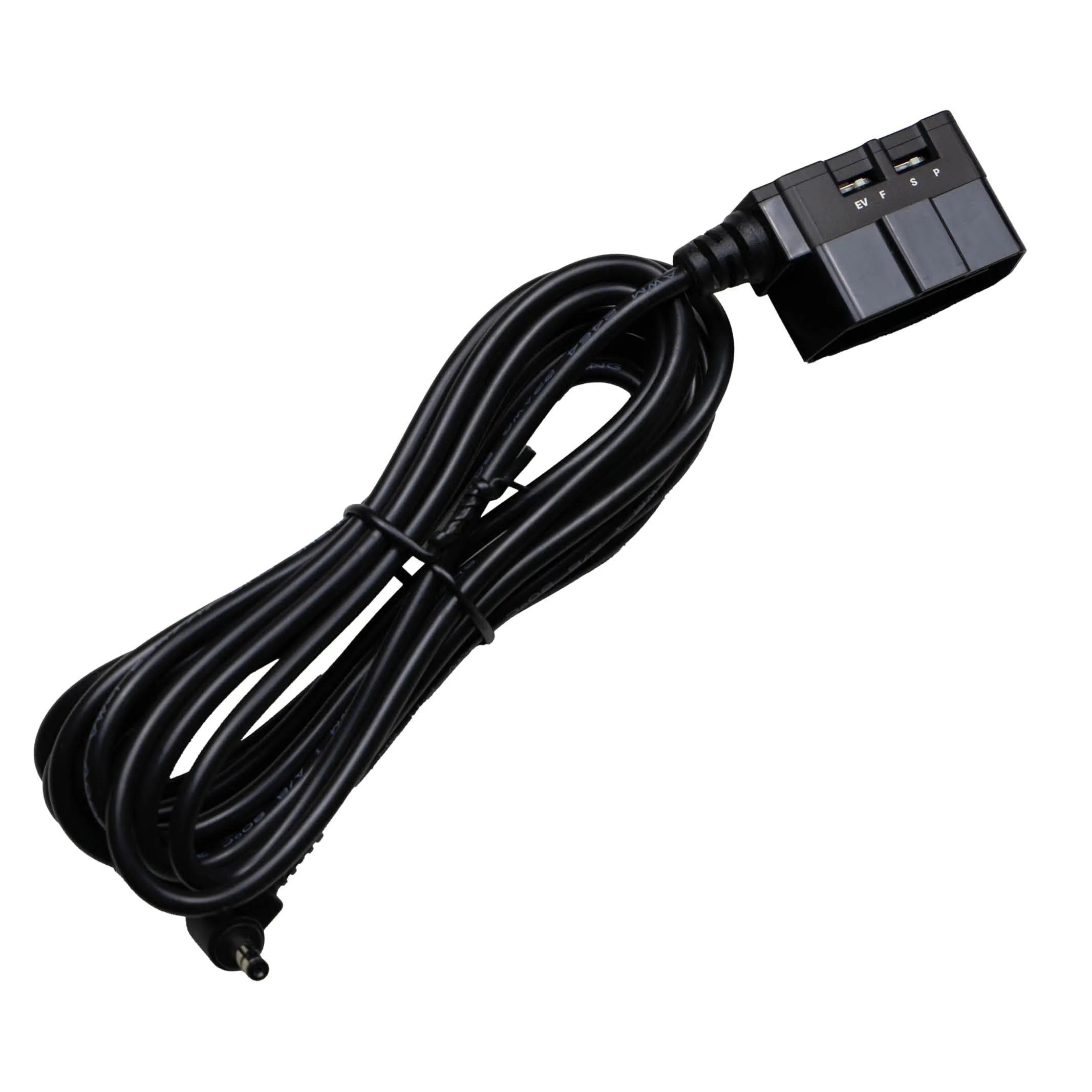
An OBD power cable can simplify some installations, but the diagnostic connector is not a universally approved accessory outlet. Check both the vehicle maker’s restrictions and the exact cable’s supported cameras, vehicle types and parking behavior before connecting it.
Camera-specific accessories are available within brands such as Thinkware and FineVu. Their connector, cutoff settings and compatibility differ. A cable fitting the socket does not establish EV or hybrid compatibility, and an OBD camera cable should not be repurposed to charge a battery pack.
Read our OBD power installation guide and have us check the full camera and vehicle details. The IROAD OBD-II IM-300 shown here is the original guide’s model reference, not a compatibility recommendation for every Mercedes.
Consider a dedicated battery for parking recording
A dedicated dash cam battery can supply the recorder while parked. Our BlackboxMyCar PowerCell 8 is one option to discuss alongside the camera and the vehicle’s approved charging source. A socket installation needs a suitable switched outlet and must remain within its permitted load.
Choose the pack’s specified input method and camera-specific output cable. Confirm ventilation, mounting, charging current and the transition from driving to parking. A dedicated pack still needs to recharge; a short commute may not restore the energy used during a long parking period.
There is no universal six-to-eight-hour limit for a vehicle-powered camera, no guaranteed battery-pack runtime and no fixed rule that an EV gets half the recording time. Camera load, temperature, battery condition, cutoff and charging opportunity all affect the result. Our EV dash cam guide explains the planning questions.


EVs need an approved low-voltage installation plan
An electric Mercedes still has a low-voltage electrical system for vehicle electronics, separate from its traction battery. Do not assume its fuse behavior or accessory interfaces match a combustion model with a similar name. B250e, EQB, EQE, EQS, eSprinter, electric G-Class and Smart electric variants need their own model-year information; this is not a current availability or production-date list.
The installer must identify the permitted supply, wake behavior and supported parking-mode signaling for the exact camera or battery pack. Voltage protection may be in the hardwire accessory or camera system; entering parking mode alone is not proof that battery protection is configured.
For example, the MY2024 eSprinter supplemental body-equipment guideline restricts aftermarket electrical connections to specified interfaces and prohibits interference with high-voltage and vehicle-network systems. That is a model-specific restriction, not permission to use the same interface on every electric Mercedes.


When there is no straightforward accessory connection
If an accessible accessory supply cannot be established, ask a Mercedes-qualified auto electrician about the approved interface for that vehicle. Do not cut insulation, add a T-tap or borrow a signal wire just because an older installation used one. Never tap high-voltage equipment, vehicle data wiring or a safety-related circuit.
A relay can be part of a professionally designed charging circuit, but it is not a universal workaround for an unsuitable supply. The installer must specify the permitted trigger, load supply, cable protection, grounding and isolation together. The diagram below explains the original guide’s relay concept; it is not a vehicle-specific wiring instruction.
Electrical changes can affect vehicle operation and warranty coverage. Ask the vehicle maker or qualified repairer about the proposed work rather than assuming either that every modification voids all coverage or that a plug-in accessory cannot affect it.


EV installation illustration
G-Class: leave room for the rear door to move
On a G-Class with a side-hinged rear door, measure the entire rear-camera route with the door both closed and fully open. Allow protected movement at the hinge area without stretching the cable, trapping it in the seal or damaging the factory loom. Preserve the boot’s seal when the installation is finished.
Our 2021 G63 AMG installation is a historical example of a two-channel setup. The right route and extension depend on your door, trim and exact camera. A cable that reaches the glass with the door shut can still be too short in use.

A removable roof changes the rear-camera position
A Cabriolet, Landaulet or other open-roof configuration may not offer the same rear mounting surface as a fixed-roof G-Class. Plan around the roof’s complete movement and the view with the roof open and closed.
A roll-bar or other structural location may be considered only when the vehicle and camera installation requirements allow it. Do not drill a roll structure or interfere with roof mechanisms, restraints or occupant clearance. An exposed location also requires equipment intended for that environment.
For this type of installation, ask us to assess the body style and mounting photos before choosing the rear camera. The original guide’s “Off-Roadster” mounting discussion is preserved here as a fitment question, not a blanket roll-cage mounting instruction.

Vans: measure length, height and interior obstructions
A long-wheelbase or high-roof van needs more than a straight-line length measurement. Follow the proposed route around interior fittings, partitions, insulation and moving rear doors. Confirm the exact camera’s approved extension before ordering, and avoid joining incompatible cables.
Compare the supported rear-cable options in the BlackVue and Thinkware ranges. A converted passenger van can need a very different path from an empty cargo van even when both are Sprinters.


Rear barn doors need their own movement check
For a rear camera on windowed barn doors, apply the same hinge-travel and seal checks as on the G-Class. Check both doors where necessary, including latches, door checks and the protected route into the body. Leave sufficient movement without a loose loop that can snag.
Keep the camera’s view clear of heated-window lines, wiper limits, cargo and interior fittings where possible. Review an actual recorded rear view before finishing the trim.
No rear window? Choose the camera and cable entry together
When a cargo van has no rear glass, an interior rear camera cannot see through the closed doors. Consider a camera designed and rated for the intended exterior location, together with its specified cable and recorder.
The original guide points to the BlackVue DR770X-2CH Truck and a Thinkware Q200 with a compatible exterior infrared camera. These are exact model references; have us confirm the full kit, channel and cable compatibility before ordering. An ordinary cabin rear camera is not automatically weatherproof.
If the approved route requires a new body penetration or bolted mount, use an installer familiar with that van and its body-equipment rules. The work needs a suitable location, corrosion protection, a sealed cable entry and clearance from wiring and structural parts. Do not drill first and look for a cable route afterward.

Check the result before relying on parking coverage
- Confirm normal startup and saved front/rear recordings.
- Check the transition into parking mode and back to driving.
- Have the installer verify the chosen cutoff and charging behavior.
- Open and close every affected door or roof without cable strain.
- Confirm trim, seals and vehicle functions are restored.
Keep the equipment model numbers and installation details with your vehicle records. If battery warnings, repeated shutdowns or electrical faults appear, stop relying on the parking setup and have the installation checked.
Vehicle instructions come first
Use the exact model-year operator manual and the applicable body-equipment instructions. The historical 2022 GLC and MY2024 eSprinter references informed the limits in this guide; they are not procedures for every Mercedes.
Let us check the camera, power kit and vehicle together
Send BlackboxMyCar your Mercedes model year and body style, camera model, desired parking coverage and any battery-pack details. Photos of the proposed camera positions help us plan the cable lengths and identify the next compatibility check.
Start with our installation hub. If you are near Vancouver or Richmond, check our installation booking page. For setup questions or help finding the right next step, use the dash cam support guide hub.
Get Help Planning My Mercedes Install