


Dash Cam Batteries, Supercapacitors And Parking Power
Choose dash cam power with our guidance on your camera, vehicle and parking routine
We start every dash cam power recommendation with your routine: do you need power while driving, support at shutdown or recording while parked? Your camera’s internal auxiliary power and a separate parking pack do different jobs. Understanding those jobs helps you plan coverage with more confidence; a chemistry label alone cannot tell you how long the camera will record.
Our job at BlackboxMyCar is to help you choose equipment for safety and peace of mind on and off the road. Here, we explain power roles, temperature and ageing so you can match parking power to your camera and vehicle. For the original THINKWARE U3000 and our PowerCell 8, we explain the power requirements and limits in their manuals. We created PowerCell 8. Use these model-specific details when choosing either product; other cameras and packs have their own requirements.

Decide which power job you need
An internal battery or supercapacitor is a component inside the camera. Its role and capacity depend on that design. For example, the original U3000 manual lists a supercapacitor as its auxiliary power unit and a separate DC 12/24 V power input. That listing does not promise a period of standalone recording.
A dedicated parking pack supplies energy to the camera through a separate output. It still needs a compatible camera connection and a way to recharge. If you want recording after the vehicle is turned off, start with the camera’s supported parking modes and power requirements rather than assuming its internal reserve will keep it running.
Resolution and connected features are separate selection questions. A 4K UHD label describes a recording specification, not parking endurance. Decide which views and features you need, then check the power requirements of that exact configuration.

Compare the tradeoffs by role
We recommend comparing complete setups for the recording you need. An internal rechargeable battery, an internal supercapacitor and an external parking pack have different roles. Use this table to narrow your choices. Chemistry and component test figures alone cannot establish price, runtime, service life or safe installation.
Budget for the camera, any optional cameras, storage, required cables, parking power and installation together.
On a narrow screen, scroll the comparison horizontally to read every column.
| Power arrangement | Question | What to verify |
|---|---|---|
| Camera with an internal rechargeable battery | Vehicle battery drain | Confirm what powers the camera while parked and which device controls discharge from the vehicle battery. |
| Camera with an internal rechargeable battery | Purchase cost | Compare camera features and the full cost of the required equipment. |
| Camera with an internal rechargeable battery | Startup | Check the model's recording indicator and startup instructions. |
| Camera with an internal rechargeable battery | Ageing and replacement | Check authorized service and replacement options when behaviour changes. |
| Camera with an internal rechargeable battery | Temperature | Read the complete product's operating, charging and storage limits. |
| Camera with an internal rechargeable battery | Charging and discharge | Ask us for the model's documented charging time and reserve capacity. |
| Camera with a supercapacitor | Voltage consistency | Read the camera's required input and the power supply's output specifications. |
| Camera with a supercapacitor | Temperature | Read the camera's own temperature limits separately from component test figures. |
| Camera with a supercapacitor | Service life | Check the test conditions behind component cycle figures and the camera's service information. |
| Camera with a supercapacitor | Missing an incident | Check startup, recording and shutdown behaviour; reserve power does not guarantee every saved event. |
| Camera with a supercapacitor | Charging and reserve | Confirm the camera's reserve function and timing in its own documentation. |
| Camera with a supercapacitor | External supply | Confirm the supported parked-power connection and parking-mode trigger together. |
| Camera with a supercapacitor | Purchase cost | Compare the price, features and required equipment of the specific cameras. |
| Dedicated parking pack | Vehicle load | Include the power drawn from the vehicle while the pack recharges. |
| Dedicated parking pack | Parking duration | Match runtime evidence to the camera load, mode and starting charge. |
| Dedicated parking pack | Monitoring | Confirm the exact app and device compatibility; treat remaining time as an estimate. |
| Dedicated parking pack | Space and placement | Check the pack's dimensions and permitted placement against the available vehicle space. |
| Dedicated parking pack | Total cost | Include the pack, compatible cables and installation when comparing complete setups. |
For a Nextbase camera or another model, compare the full setup cost and the exact camera's power and service requirements. Ask us to help compare camera options.

Check startup, shutdown and saved files
Before your first drive, learn your camera’s recording indicator so you can recognize when it is ready. The original U3000 begins recording only after startup is complete, according to its manual. We recommend learning your model’s startup sequence instead of relying on a universal startup time.
For shutdown, follow the exact model’s instructions and ask what its internal reserve is designed to support when external power stops. Do not assume a fixed number of minutes, a particular charging delay or guaranteed completion of every file. The U3000 manual expressly limits incident capture and responsibility for lost recordings.
We also recommend checking the clock and settings. The U3000 offers time and daylight saving settings, but its supercapacitor listing does not explain how long they persist without power. If your clock resets or files are missing, tell us what happens so we can help with the model-specific question. Do not open the camera to investigate.
Understand battery and supercapacitor terms
Batteries and supercapacitors store energy supplied to them. A rechargeable battery stores energy through chemical processes. During charging and discharge, electrons move through an external circuit while ions move inside the battery’s electrolyte.
Lithium iron phosphate, written LiFePO4, is a lithium-ion battery chemistry. A supercapacitor stores energy differently. Our PowerCell 8 uses LiFePO4, as its manual specifies. When comparing other products, use their documented chemistry; a photograph of cells cannot identify it.
An electric double-layer supercapacitor stores energy at electrode and electrolyte interfaces. KYOCERA AVX’s technical papers describe this construction and its use for brief backup power. Component papers can explain the principle, but their charging times, cycles and temperature tests are not specifications for a complete dash cam.

Plan for ageing and service
Rechargeable batteries change with use because their charging and discharging processes are not perfectly reversible. The Department of Energy explains that changes in materials can reduce performance and safety. Replacement timing and cycle life depend on the product and how it is used.
For a useful service-life comparison, we recommend looking beyond the cycle count. Ask about temperature, discharge depth and remaining capacity at the end of the test. Supercapacitor component figures also depend on application conditions. An advertised cycle count cannot guarantee years of camera operation.
If your camera or pack behaves differently, tell us what happens, how it is powered and which warning indicators appear. Those details give us a useful starting point for helping you. Follow the product’s service instructions: the U3000 and PowerCell 8 manuals prohibit unauthorized disassembly or modification. Warranty and service terms depend on your purchase.

Separate operating, charging and storage temperatures
Read the limits for each device and each use. The original U3000 manual specifies operation from -10°C to 60°C and storage from -20°C to 70°C. It also warns against direct sunlight and use outside those ranges. These are original-model limits, not a temperature rating for every THINKWARE camera.
Charging temperature, storage temperature, ambient conditions and an internal protection threshold are different measurements. The PC8 manual describes temperature protection that can stop charging or discharging and warns against hot storage and direct sunlight. Its internal protection threshold is not permission to leave the pack operating in a hot cabin.
We recommend planning for the conditions where you actually park, including sun and cold weather, using both the camera and pack instructions. Temperature protection can stop the camera’s supply, which can also stop recording.


Match vehicle input, camera output and the parking signal
For the PC8, INPUT is the vehicle connection used to charge the pack; OUTPUT supplies the dash cam. Choose the camera-output cable separately from the vehicle charging connection. A shared camera-output cable family does not establish expansion-battery compatibility.
When we help you choose a cable, we consider the parking-mode signal as well as power. Some cameras need an ACC signal to distinguish driving from parking; others switch differently. Your exact camera needs the approved cable that provides its required signal. Without it, a powered camera may stay in normal recording.
We recommend confirming how your vehicle’s outlet behaves before choosing a charging connection. The U3000 manual warns that some 12 V outlets remain powered after ignition is off and can drain the vehicle battery. A socket that powers your camera may not support a parking pack’s charging load, and you cannot assume it switches off.
For the original U3000, the manual’s parking instructions require continuous power through its hardwiring arrangement and professional installation by a trained mechanic. Its battery-protection cutoff, off timer, external-battery setting and thermal protection have distinct purposes. A low cutoff or prolonged parking can still leave the vehicle unable to start. Follow the exact equipment and vehicle instructions rather than selecting a fuse or cutoff from a photograph.
Read the hardwiring guide for an installation overview, then follow your exact vehicle, camera and power-equipment instructions.

Size parking power around your use
Describe how long you park and how much driving you do between stops. Request runtime evidence that names the camera, number of channels, parking mode and any other connected loads. Starting charge, temperature protection and cutoff or timer behavior also matter. Treat an app’s remaining-time figure as an estimate.
We look at your time between drives as well as pack capacity when helping you plan parking coverage. A dedicated pack supplies stored energy to the camera and draws power from the vehicle when recharging. Include that charging load in your plan; using a pack does not establish reduced vehicle wear or longer vehicle-battery life.
Compare the pack's dimensions with the available space and follow its placement and temperature instructions. Check whether an under-seat location is permitted and suitable for your vehicle. Include cable routing and installation work in the plan.

Decide whether a USB power bank suits your camera
For a USB power bank, check the camera's voltage and current requirements, cable compatibility, whether output stays on at the camera's load, and whether simultaneous charging and output are permitted. Read the bank's temperature and in-vehicle-use instructions as well.
A 5 V USB connector does not establish USB 3, USB Power Delivery or suitability for a laptop or router. The PC8 manual identifies a USB connector and shows mobile-device use on one page, but its precautions restrict use to dash cam power. Resolve that conflict with our team before using the port for other equipment.
If remote access matters, verify connectivity separately from power. The original U3000 manual requires internet access for THINKWARE CONNECTED, qualifies features by service plan and warns of carrier charges. It excludes those connected features in Energy Saving and Radar parking modes. Supplying power to a router would not by itself establish a supported connected-camera setup.

Choose our PowerCell 8 around your parking needs
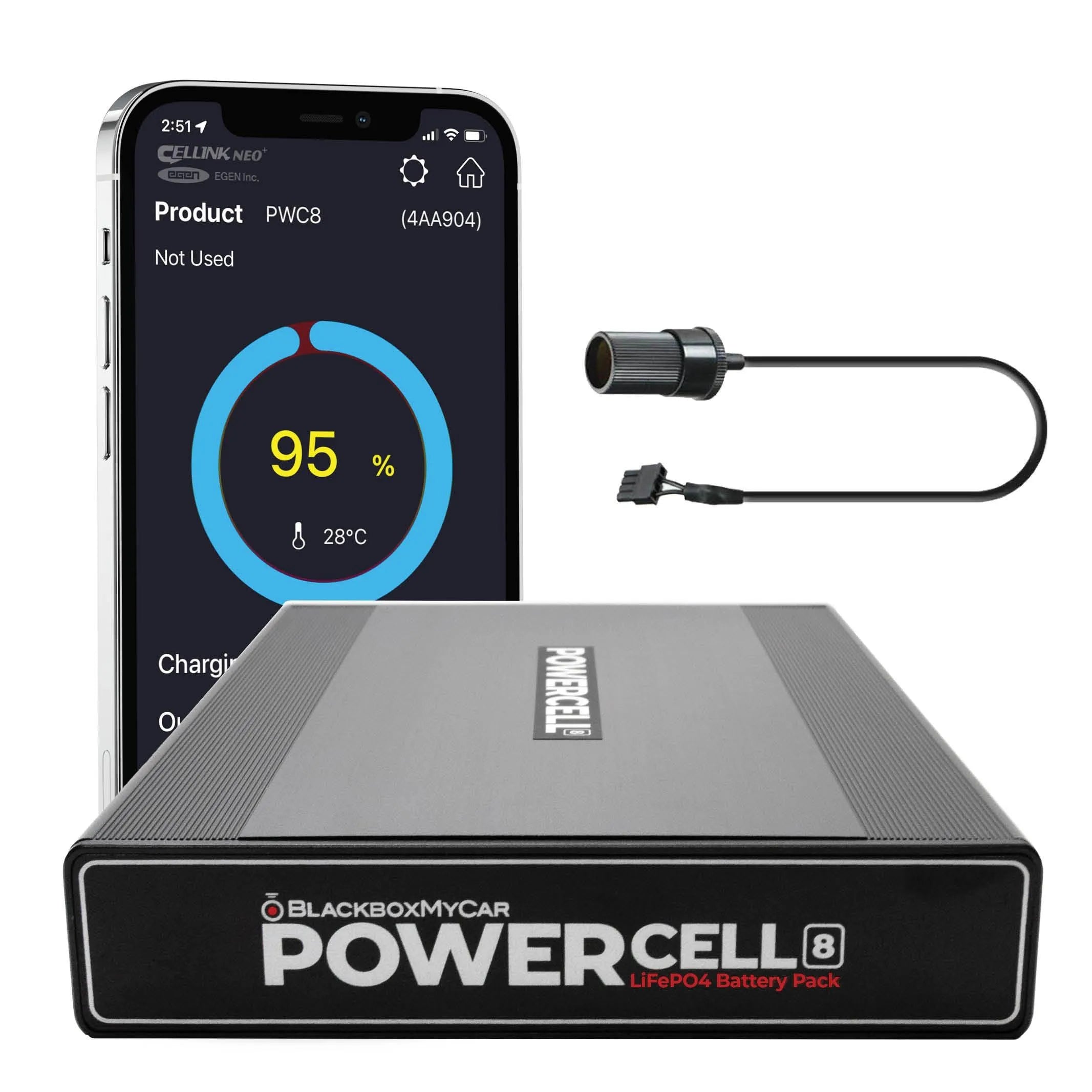
Our PowerCell 8 is the battery pack we created for dash cam power. Its manual specifies LiFePO4 chemistry, 12.8 V, 7,500 mAh and 96 Wh, and lists EGEN as the manufacturer. We can help you match your unit and cable requirements to that manual and confirm current kit contents and runtime for your camera.
Before planning around a full-charge time, ask us about your exact PowerCell 8 hardware and charging connection. The manual separates vehicle input limits from battery charging current, but its charge-current maxima and charging-time labels conflict. Its runtime example also needs clarification. We recommend using runtime evidence for your selected camera and mode, with those conflicts resolved before relying on a time estimate.
The manual names the Bluetooth app Cellink Neo Plus and describes pack status, internal temperature, input and output readings, capacity and time estimates. Ask us to help confirm the current app, phone compatibility, service terms and pairing instructions for your unit. An older Battery Manager name or pictured interface cannot establish current compatibility.
For expansion, the manual names the original Cellink NEO Extended and describes a specific connection. Before adding capacity, confirm the exact pack, expansion model and required cable with our team. Do not substitute a newer similarly named model, assume BlackVue B-124E compatibility or multiply a runtime by a promised number of expansion packs.
Prepare the complete setup before buying
Our recommendation is to choose the views and recording features you need first, then match power to your vehicle and parking routine. That keeps the choice focused on your coverage needs and the exact models involved. A camera-and-pack bundle still needs the correct output cable, charging connection and parking-mode configuration.
Bring us your camera model and firmware, optional cameras, vehicle details, power equipment and cable identifiers. Tell us how long you park, how much you drive between stops, the temperatures you face and any startup or charging symptoms. We can use those details to help you compare a complete setup.
Before you order, confirm the current item, included equipment, availability, total price, shipping and applicable warranty or return terms. Ask us about the help available and installation scope for your setup.
If you are planning power for an electric vehicle, use the electric-vehicle dash cam guide alongside your vehicle's instructions.
Questions to settle before choosing your setup
- Power purpose: Do you need support at shutdown, parked recording or both? Verify those roles separately.
- Camera configuration: Name the exact camera model, firmware and optional cameras before comparing power requirements.
- Recording readiness: Learn the recording indicators and shutdown instructions; request model-specific help for resets or missing files.
- Clock and settings: Check date and time settings and ask how the unit retains them when disconnected.
- Parking events: Choose the events and mode you need; confirm the trigger and any buffering in the exact instructions.
- Supply and parking signal: Confirm both the main supply and any signal needed to switch from driving to parking.
- Cutoff behavior: Identify which device supplies cutoff protection, what it monitors and which load stops.
- Vehicle connection: Have the actual outlet or proposed circuit assessed for switching behavior and the intended charging load.
- Parking duration: State parking length, camera load and mode when requesting runtime evidence.
- Time to recharge: Describe your driving time between stops; ask whether that charging opportunity suits the complete setup.
- Storage and files: Check required storage and the model’s file-review and preservation instructions.
- Temperature: Read separate operating, charging and storage limits for the camera and pack.
- Placement: Check dimensions, cable routing and permitted placement against the available vehicle space.
- Ageing and service: Ask about lifetime test conditions and authorized service; do not open equipment to identify cells.
- USB-bank workflow: Confirm voltage, current, output behavior and permitted simultaneous charging for the exact USB bank.
- Auxiliary ports: Confirm permitted uses and device requirements; resolve the PC8 manual’s conflicting USB-use instructions.
- Monitoring and expansion: Verify the exact app, phone and expansion models with their required cables.
- Complete purchase: Compare equipment and installation costs, then confirm current purchase terms and help scope.
Browse current options: 4K UHD Dash Cams, VIOFO Dash Cams, BlackVue Dash Cams, Thinkware Dash Cams, FineVu Dash Cam Accessories. Check each exact model’s power requirements and included equipment separately.
Questions about dash cam power
Will a camera’s internal battery record all night?
We recommend a supported parking mode and suitable power supply when you want overnight coverage. An internal auxiliary-power listing alone cannot establish overnight recording; its purpose and capacity depend on the exact model. The original U3000 manual treats its supercapacitor and continuous parking power separately.
Does a supercapacitor guarantee a saved final file?
No chemistry label guarantees every file or incident. Follow the camera’s startup and shutdown instructions and check its recording indicators. The original U3000 manual warns that recording starts after boot and does not guarantee every event or prevent lost recordings.
Is LiFePO4 different from lithium-ion?
LiFePO4 is lithium iron phosphate, a lithium-ion battery chemistry. Its name does not establish unlimited cycling, a safe hot-cabin temperature or a fixed runtime for a particular parking setup.
Why is my powered camera still in normal recording?
Start with how your exact camera enters parking mode, then confirm the selected cable delivers its required signal. Power alone may not provide it. Tell us your camera model and cable so we can help you narrow down the setup question. Follow the equipment instructions or use qualified installation help; do not modify wires from a generic example.
Why does a parking pack stop charging or supplying power?
Compare the symptom with the exact unit’s indicators and protection instructions. The PC8 manual distinguishes low-input-voltage charging protection from internal-temperature protection that can stop charging or discharge. Neither establishes a camera-output cutoff setting or a guarantee that the vehicle will start.
Can I use a phone bank, router or expansion battery?
Confirm each device and connection separately. A USB connector does not establish a supported phone, laptop or router use. The PC8’s conflicting USB-use instructions need clarification from our team, and its original NEO Extended reference does not approve a different expansion model.
How much parking time and charging time should I expect?
Ask us for evidence for the exact camera load, mode, pack and charging connection, with the starting charge and temperature conditions stated. The PC8 manual’s conflicting charging figures and ambiguous runtime example are not a basis for a fixed time promise.
Can I replace the internal battery myself?
Use the exact product’s service instructions. The U3000 and PC8 manuals prohibit unauthorized disassembly or modification.
Resources
-
Department of Energy: batteries
Read the energy-storage and rechargeable-battery explanation.
-
Department of Energy: lithium iron phosphate
Read the lithium-ion electrode-material context for LiFePO4.
-
KYOCERA AVX: supercapacitor backup power
Read the component-level explanation and application qualifications; it is not a dash cam specification.
-
Original THINKWARE U3000 support and manuals
Find the original U3000 instructions. Use the manual for your model and firmware; newer models need their own instructions.
-
PowerCell 8 manual
Read the PowerCell 8 connections, protection and service instructions. Ask us about the manual’s charging, runtime and USB-use conflicts before relying on those details.
Need help matching parking power?
Let us help you match parking power to your routine. Contact our BlackboxMyCar team with your camera model and firmware, vehicle, cable identifiers and parking routine so we can work through the connections and coverage you need.
Contact UsChoose a PowerCell 8 setup
BlackboxMyCar PowerCell 8 LiFePO4 Bluetooth Dash Cam Battery Pack
Our PowerCell 8 LiFePO4 battery pack supplies power for your dash cam. We can help you choose the camera-output cable and vehicle charging connection, so your parking-power plan fits the equipment you use.
Shop Now