Skip to content
SKU RF-Phil-GS5101-1

[REFURBISHED - CLEARANCE] Philips GoSure GS5101 2K QHD Single-Channel Dash Cam

Availability:
in stock, ready to be shipped
Save 68% Save 68%
Original price $169.99
Original price $169.99 - Original price $169.99
Original price $169.99
Current price $54.99 CAD
$54.99 - $54.99
Current price $54.99 CAD
Certified Refurbished
Every order includes:

Chat with an expert

Talk to a dash cam expert before you order.

Philips GoSure GS5101 2K Single-Channel Dash Cam

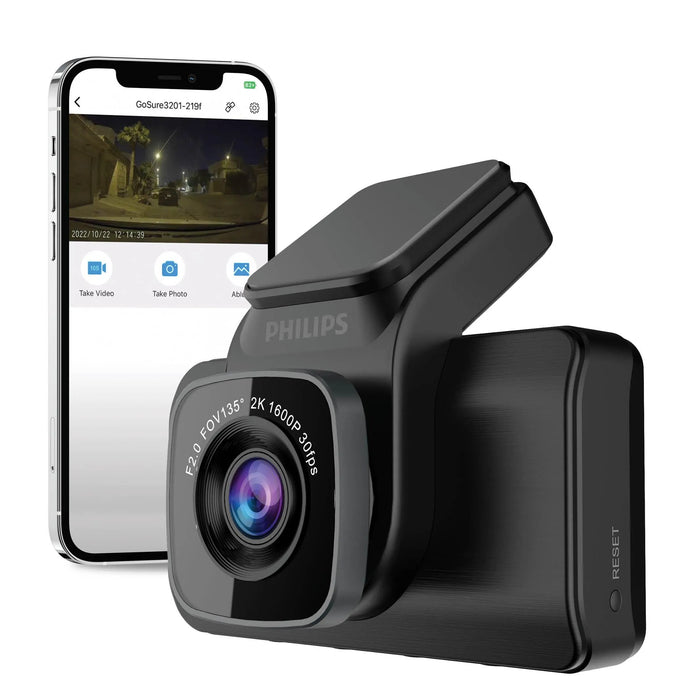
The Philips GoSure GS5101 records the road ahead at 1600p and 30FPS, with a Sony STARVIS sensor and a 135° lens. Its built-in screen and four control buttons let you change settings directly on the camera.

This package includes the front camera, a 12V vehicle adapter and 3.6m power cord. Connect through 2.4GHz Wi-Fi to the GoSure Safe app for phone playback and settings. The camera has no GPS. If GPS location and speed recording are important, compare a GPS-equipped dash cam before ordering.

2K 30FPS

Sony STARVIS

Built-in Screen

2.4GHz Wi-Fi

Voice Commands

1600p recording with a Sony STARVIS sensor

The GS5101 uses a Sony STARVIS IMX335 sensor, an F2.0 lens and H.264 video compression to record MP4 files. Its 135° view covers the road in front of your vehicle. Aim the lens after mounting and check a recording before your first trip.

The sensor and lens help in low light, but readable detail still depends on lighting, motion and distance. The original BlackboxMyCar sample video below is labelled GS5101D; it is retained as a series demonstration. This listing supplies one front camera, with no rear camera included.

Mount the camera and connect the supplied power cable

Clean the mounting area, attach the adhesive base and rotate the lens until the image is level. Position the camera where it has a clear view through the windshield and does not obstruct your view.

Route the supplied 3.6m cord clear of airbags and moving parts, then connect its Micro USB end to the camera and the adapter to a 12V accessory outlet. The camera starts recording when power comes on with a prepared memory card installed. Whether it stops with the ignition depends on how your vehicle powers that outlet.

Philips GoSure GS5101 front camera mounted behind a vehicle windshield

Use the screen or connect to GoSure Safe

The four buttons beneath the display control menus, microphone recording and emergency recording. Entering the menu stops recording. Return to the recording view and check the status light before driving: blinking red means recording; steady red means powered on but not recording.

For phone access, install the third-party GoSure Safe app linked in Resources. Turn on the camera, choose Connect device in the app and join the camera’s GoSure5101 Wi-Fi network. The manual lists the initial password as 12345678. Wi-Fi is a nearby connection, with no remote Cloud monitoring.

Back up clips you want to keep before formatting the card. Check the app store’s current phone requirements, and make settings changes while parked. Firmware updates are available through the app’s device settings when offered; leave the camera connected throughout an update.

Philips GoSure GS5101 screen showing its settings menu and Format SD card option

Parking recording needs the right hardwire kit

The camera offers collision-triggered parking recording and time-lapse recording with the engine off. Both require a separate compatible hardwire kit with low-voltage detection and voltage conversion, as specified in the manual. The supplied cigarette-lighter adapter alone does not provide that installation.

Check the power connector and voltage requirements before choosing a kit. During normal driving, the G-sensor can lock an impact clip in the emergency folder, with low, medium and high sensitivity settings. Copy important footage promptly: the manual warns that locked files can still be overwritten, and formatting deletes them.

Vehicle accessory outlet and cigarette-lighter adapter illustrating the included plug-in power connection

Voice commands and driver reminders

English voice commands let you say “Take photo”, “Lock video”, “Open recorder” or “Close recorder”. The microphone must be switched on and the phone app disconnected for voice control to work.

Stop & Go can alert you when the car ahead starts moving. A driving-time reminder can prompt a break after the selected interval. These reminders assist the driver; they do not measure your alertness or control the vehicle.

The North American manual distinguishes English voice commands from spoken status announcements, which it lists as Chinese only. That includes its driving-time announcements. Check these sound settings during setup if spoken alerts are important to you.

Driver using the Philips GoSure GS5101 onboard controls while the vehicle is parked
What's Included
  • Philips GoSure GS5101 front dash cam with adhesive mount
  • 12V cigarette-lighter adapter
  • 3.6m power cord, approximately 12ft
  • Philips GoSure manual
Philips GoSure GS5101 package with front camera, vehicle adapter and power cord
Specifications
Camera Configuration Front only
Front Resolution 2K / 1600p at 30FPS
Front Image Sensor Sony STARVIS IMX335
Front Field of View F2.0; 135° field of view
Recording Modes Loop recording: Supported; back up important files before overwrite or formatting; G-sensor: Three-axis; low / medium / high sensitivity
Display Built-in display with four buttons
Connectivity 2.4GHz; local phone connection
GPS Not supported
Parking Mode Collision-triggered recording and time lapse; compatible hardwire kit required
Storage Support 16GB to 128GB, Class 10; sold separately
Included Memory Card Not included
Power 12V through the supplied adapter
Operating Temperature −10°C to 60°C, approximately 14°F to 140°F
Dimensions 90 × 84 × 42mm
Warranty 12 months, backed by BlackboxMyCar
Mobile app GoSure Safe, provided by a third party
Video files MP4; H.264 compression
Storage reference North American GS5101 manual
Voice commands English; microphone on and app disconnected
Spoken alerts Chinese only, according to North American manual
Driver reminders Stop & Go and driving-time reminders
Power connection Micro USB
Power cord 3.6m, approximately 12ft
Listed power consumption Less than 3W
Storage temperature −20°C to 70°C, approximately −4°F to 158°F
Camera weight 170g
Cloud Not supported
Frequently Asked Questions

Is this a front-and-rear dash cam package?

No. This listing includes the GS5101 front camera only. Philips identifies its RC50 as an optional rear camera, sold separately; confirm availability before planning an upgrade.

What resolution does it record?

The front camera records 1600p at 30FPS using a Sony STARVIS IMX335 sensor. Philips markets this as 2K video.

Is a memory card included?

No. Use a genuine Class 10 microSD card from 16GB to 128GB, as specified in the North American manual. Format it in the camera before use and switch off the camera before removing it.

Why does another Philips page say 64GB?

Philips publishes regional specifications. The North American GS5101 manual supplied here recommends 16GB to 128GB; that is the storage reference for this listing.

Does the camera record when the vehicle is parked?

It supports collision-triggered parking recording and time lapse, but both need a separate compatible hardwire kit with low-voltage detection and voltage conversion. That kit is not included.

Does the cigarette-lighter adapter provide parking protection?

The included adapter powers the camera from a 12V accessory outlet. For the parking and time-lapse installation described by Philips, use a compatible hardwire kit; do not assume an outlet that stays powered provides battery protection.

Which app should I use?

Use GoSure Safe, the third-party app named in the North American manual. Links to its current Canadian App Store and Google Play listings are in Resources. Check the phone requirements before downloading.

How do I connect the app?

Power the camera, open GoSure Safe and select Connect device. Join the GoSure5101 network in your phone’s Wi-Fi settings; the manual lists the initial password as 12345678.

Can I watch remotely or record my GPS location?

No. The GS5101 uses a nearby Wi-Fi connection for phone access and does not have GPS or remote Cloud monitoring.

Does it keep recording while I change menu settings?

No. Entering the menu stops recording. Return to the recording view and check that the red status light is blinking before driving.

What do the indicator lights mean?

Blinking red means recording; steady red means the camera is on but not recording. Blue means its power supply is connected.

Which voice commands work in English?

The manual lists “Take photo”, “Lock video”, “Open recorder” and “Close recorder”. Switch the microphone on and disconnect the app first.

Are the spoken announcements also in English?

The North American manual lists spoken status and driving-time announcements as Chinese only. It lists the four voice commands separately as English.

What does the G-sensor do?

An impact above the selected sensitivity threshold triggers an emergency clip. Back up important clips promptly; the manual warns that locked files can be overwritten, and formatting deletes them.

What do Stop & Go and fatigue reminders do?

Stop & Go detects the car ahead starting to move. The driving-time reminder prompts a break after the chosen interval. Neither takes control of the vehicle or measures whether you are fit to drive.

Can it guarantee readable licence plates at night?

No. The STARVIS sensor and F2.0 lens help capture low-light scenes, but exposure, movement, distance and lighting affect the recorded detail. Check original sample footage to judge the image for your needs.

Is there an alternative with GPS?

Choose based on whether GPS location recording or a built-in display matters more to you.

What condition is this unit in?

BlackboxMyCar Outlet products are tested, like new and backed by our in-house 10-point check. This unit includes a 12-month BlackboxMyCar warranty and our normal return policy. See our warranty and Outlet terms.

What accessories and package limitations should I check?

A microSD card is required and sold separately. A rear camera and compatible parking-mode hardwire kit are also separate purchases.

Resources

BlackboxMyCar series review

This original review is labelled GS5101D and discusses the GoSure camera series. Use the package list above for this front-only unit; historical offers and new-product warranty terms in a video do not apply.

Manual and specifications

GoSure Safe app