


VIOFO WM1 vs. A119 V3: Phone Access or an Onboard Screen?
Choose the front-only camera and power setup that suit your routine
Original WM1 or A119 V3?
The original VIOFO WM1 and A119 V3 take different approaches to a simple front-only setup. We would start with how you want to retrieve a recording: through your phone nearby, or directly on the camera’s screen.
This guide compares those exact models. The WM1S, A119 MINI 2 and A119M Pro have different hardware and features, so match the full name on the camera before choosing accessories or firmware.

Screenless camera or onboard display
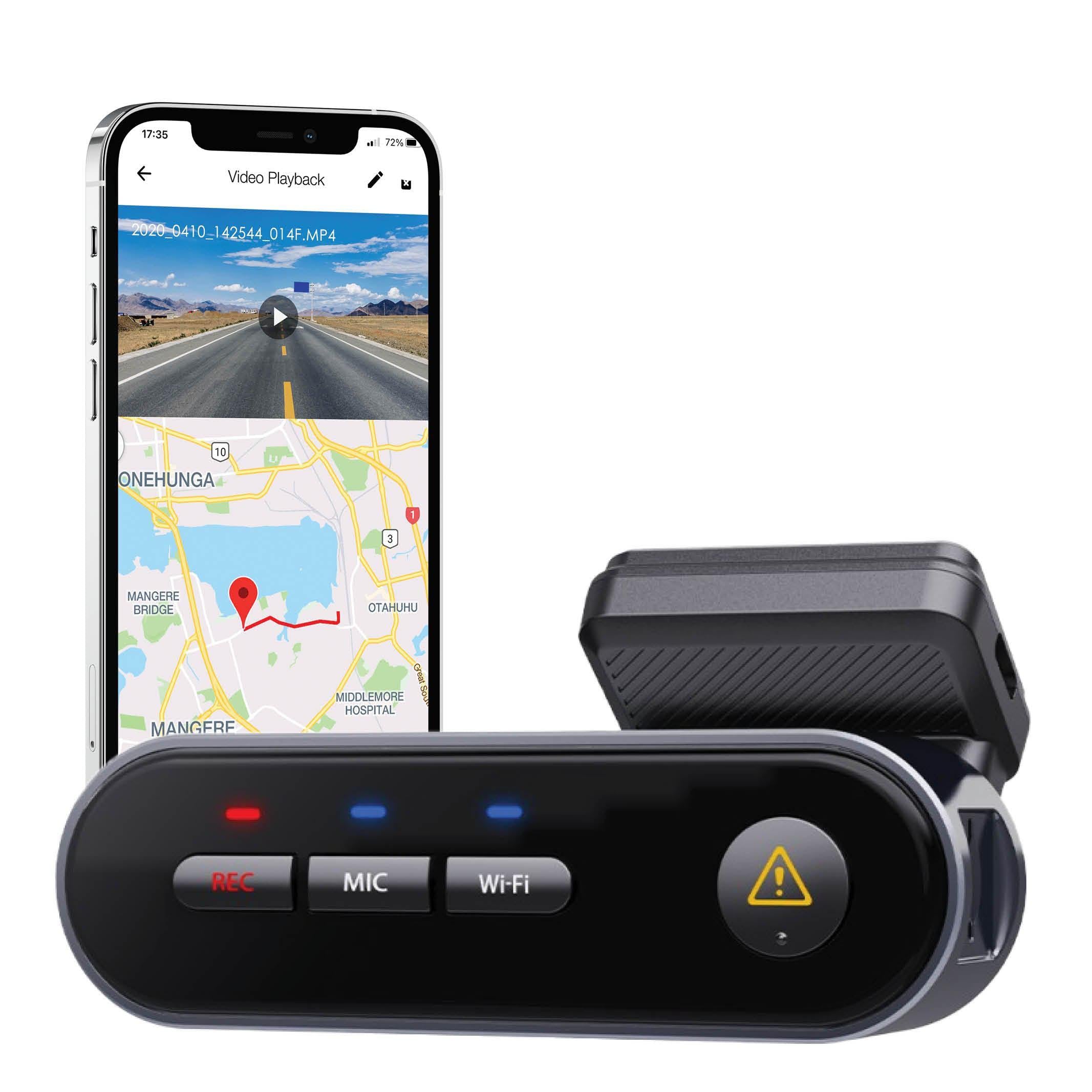
The WM1 has a tubular, screenless body and an adjustable mount. Its local 2.4 GHz Wi-Fi connects to the VIOFO app for playback and settings. We recommend checking that app on your phone before making phone access the deciding feature.
The wedge-shaped A119 V3 has a 2-inch screen for playback and settings. It is the more convenient choice if you want to make a quick check without connecting a phone. Before fitting either camera, leave room for its mount and cable while keeping your driving sight line clear.

Check the space around the mount
The WM1’s published dimensions are 3.87 × 1.21 × 1.04 inches. Its small body still needs enough space for the mount, cable and a clear lens view. The size graphic below is an illustration; check the actual installation area in your vehicle.

Resolution and exposure processing
Both original models use the 5MP Sony STARVIS IMX335 sensor. VIOFO lists the WM1 at 2560 × 1440 at 30 FPS and the A119 V3 at 2560 × 1600 at 30 FPS. The shared “2K” label does not make these settings identical.
The original WM1 supports WDR. The A119 V3 supports HDR with applicable firmware; its current manual limits recording to 30 FPS when HDR is enabled. These specifications do not establish a low-light winner.
Both are single-channel systems. Neither becomes a front-and-rear or cabin setup by adding a secondary camera.
VIOFO lists a 135° view for the WM1 and 140° for the A119 V3. The listings do not specify the measurement axis consistently, so those figures alone do not establish which installation will cover more of your surroundings. Check the actual view in your vehicle.

Parking modes need the right power setup
Both cameras offer Auto Event Detection, Time-lapse and Low Bitrate Recording. Start with the event-based mode if you want triggered clips; consider time-lapse or low bitrate if you prefer an ongoing record. Each needs compatible power after the engine is off. Our parking-mode guide explains the tradeoffs.
Use the Mini-USB HK3 for the A119 V3 and Type-C HK4 for the original WM1. VIOFO’s HK3 instructions and HK4 instructions keep those power paths separate. A matching plug or connector adapter does not establish ACC parking compatibility.
We created PowerCell 8 for dash cam parking power. If you are considering an external dash cam battery, ask us to match the exact output lead and ACC setup to your camera. A battery pack does not make every cable or parking feature interchangeable.
The WM1 manual says its Parking Entry Timer does not work with an external battery. That limit applies to the timer; it does not establish that every battery setup is incompatible.
Power cutoff, settings and temperature affect recording duration. Buffered recording applies to Auto Event Detection. Check the exact firmware documentation rather than assuming every parking mode saves the same clip.

Notifications, saved files and GPS
The WM1 offers spoken status notifications and a file-lock button. Notifications announce camera status; they are not voice commands or proof that an important file was saved. Check the recording and back it up.
The A119 V3 has no Wi-Fi or spoken notifications. During recording, press the A119 V3’s Emergency/Confirm button once to lock the current file. You can review files on its screen, connect it to a computer with a suitable data cable, use a memory-card adapter, or use a card reader compatible with your phone. Back up important recordings before formatting a card.
WM1 GPS logging records position and speed information. A119 V3 GPS depends on the GPS-capable mount configuration. These logs do not provide remote vehicle tracking.
Compare the original models
These are original-model capabilities. Check the exact unit, firmware and included accessories before treating a used or legacy listing as the same configuration.
Swipe or scroll horizontally to compare the models
| Feature | VIOFO WM1 | VIOFO A119 V3 |
|---|---|---|
| Recording listed by VIOFO | 2560 × 1440 at 30 FPS | 2560 × 1600 at 30 FPS |
| Screen | No screen | 2-inch display |
| Local phone connection | 2.4GHz Wi-Fi | No Wi-Fi; compatible phone card reader is an alternative |
| Exposure processing | WDR | HDR with applicable firmware |
| GPS logging | GPS-equipped mount assembly | GPS-capable mount configuration required |
| ACC hardwire kit | Type-C HK4 | Mini-USB HK3 |
Which workflow suits you?
WM1: local phone access
We would choose the WM1 for its screenless installation, local phone connection and spoken notifications. If you already own one, check the app connection and a saved clip before relying on that workflow.
A119 V3: onboard controls
We would choose the A119 V3 if an onboard screen is more useful to you than Wi-Fi. A compatible phone card reader is another way to copy recordings, so you are not limited to the small display.

Check your exact setup
Confirm the exact model, firmware, power connection and how you will save recordings before relying on either camera. Use the manuals and firmware directory or contact BlackboxMyCar with your model, firmware version, phone model and power setup for help with an existing unit.
For a different camera, browse our VIOFO dash cam range. For an existing WM1 or A119 V3, send us the exact model, firmware and power setup so we can help you choose the right next step.
Manufacturer references: original WM1 specifications, A119 V3 with GPS specifications, WM1 English manual, A119 V3 English manual, hardwire kit manual directory and recording playback options.